2. How does an agent actually work?
The eight emails went out. It's 10:03 PM. You're still on the couch, a little stunned at how quick that was, and a little suspicious. How did it actually do that? You typed one sentence. Three minutes later, eight emails were sent, with the right addresses, referencing the right conversations, signed off the way you usually sign off.
You didn't see a single tab open. You didn't watch a cursor move. From your seat it just happened.
It's worth slowing down and pulling that apart, because the rest of this book leans on the answer. Once you can see the moving parts, every chapter from here on — skills, MCPs, sub-agents, scheduled work — clicks into place. They're all variations on the same picture.
The picture
Here's the entire model. Burn this into your head, because it is the only diagram you really need:
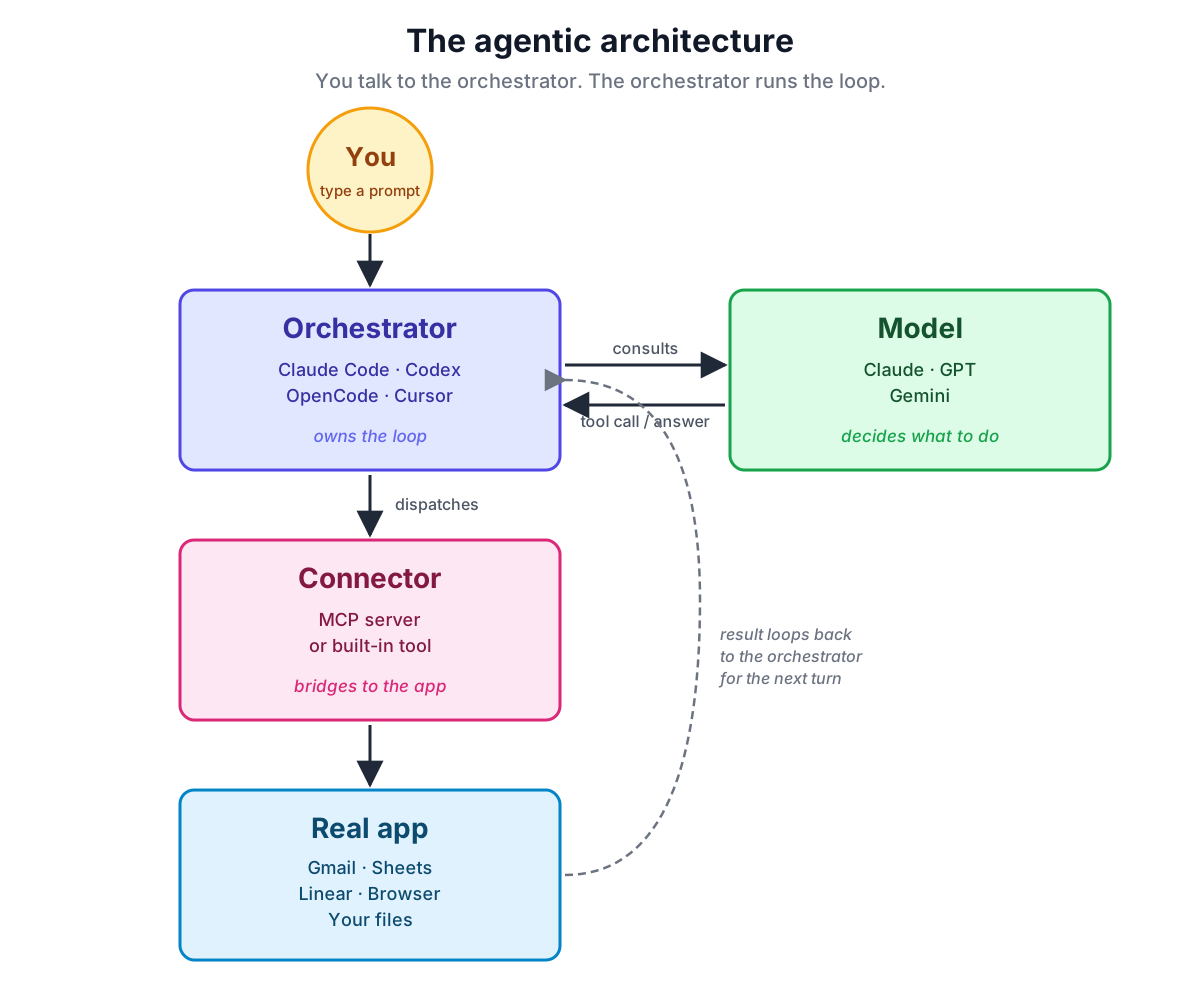
Read it like this: a sentence from you goes into the orchestrator — the program running on your machine (Claude Code, Codex, OpenCode, Cursor). The orchestrator packages your sentence with system instructions, file context, and the list of tools it has, and consults the model. The model writes back either prose or a tool call. If it's a tool call, the orchestrator dispatches it through a connector to the matching real app — reads your inbox, writes a row in a sheet, opens a browser, sends a message — then hands the result back to the model for the next turn. That loop is the agent.
Each box has a job. Let's walk them.
Box 1: you
You write a sentence. Sometimes a paragraph. Occasionally you drop in a screenshot or a file. That's it. Your job in the loop is to decide what should happen — and to watch as it happens.
That sounds trivial; it isn't. The quality of what comes back is mostly a function of how clearly you said what you wanted. The book spends an entire chapter on this (Ch. 10), but the short version is: brief the agent like you'd brief a smart colleague who just walked into the room. Give it the context it doesn't already have. Show, don't just tell. A screenshot beats a paragraph of description nine times out of ten.
Box 2: the Orchestrator
The Orchestrator is the piece of software running on your machine (or in some cases, in a vendor's cloud) that you actually type into. When you launch Claude Code in a terminal, or Codex, or OpenCode, you are running the orchestrator. This is what the user touches — not the model directly. The orchestrator owns the loop; the model is something it consults.
Its job is the boring, important glue:
- Take your sentence, package it with relevant context (your
CLAUDE.md, project files, recent screenshots, prior conversation, the list of tools currently available), and send it to the model. - Read what the model writes back. If the model wrote prose, show it to you. If the model wrote a tool call, route that call to the right connector.
- Take the result, hand it back to the model so it can think about the next step, and loop.
- Manage memory: what's been said, what's been done, what should be forgotten when the context window fills up.
The loop in step three is what makes an agent feel different from a chatbot. A chatbot does one round-trip — your sentence in, model's answer out. An agent runs a loop: orchestrator asks the model, model writes a tool call, orchestrator runs it, result goes back to the model, model writes the next call, repeat until done.
You will hear this loop called many things: the "agent loop", the "ReAct loop", the "tool-use loop". They all mean the same thing — and the orchestrator is the thing actually running it.
Box 3: the Model
The Model is the brain the orchestrator consults. It is the part you already know — GPT-5, Claude, Gemini, whichever underlying large language model your agent is built on. It reads the packaged-up context the orchestrator sends and produces words. That's all an LLM does, fundamentally: predict the next batch of words.
What's new is what it's now writing. In chatbot mode, it writes an answer for you to read. In agent mode, it writes one of two things:
- An answer — the same as before, when an answer is what you needed.
- A tool call — a tiny structured instruction that says "call the Gmail connector and send this email to this address" or "open the file
notes.txtand read it back to me".
The model doesn't do anything itself. It doesn't have hands. It writes either prose for the orchestrator to show you, or a request for the orchestrator to act on. The model is the part that decides; the orchestrator and everything beyond it is the part that executes.
This matters because it explains why agents from different vendors feel similar. Underneath, they're all the same shape — an orchestrator that consults a language model and dispatches its tool calls. The personality varies. The shape doesn't.
Box 4: the Connectors (MCPs)
Here is the part that's genuinely new, and the part that gives this book half its vocabulary.
The Model can write "call the Gmail connector". But how does the orchestrator know what Gmail can do, what arguments to pass, what format the response comes back in? Someone has to write a piece of software that bridges generic instructions from a language model to specific calls to the Gmail API — and that bridge has to be in a format both the orchestrator and the model can read.
We call that bridge a connector. The dominant kind of connector today is an MCP server. MCP stands for Model Context Protocol — an open standard, originally published by Anthropic in late 2024, that defines a shared language for "here is a tool the model can call". Once a tool speaks MCP, any MCP-capable orchestrator — Claude Code, Codex, OpenCode, Cursor, Gemini CLI — can use it.
Not every connector is an MCP. Orchestrators also ship with built-in tools they dispatch directly — file Read/Write, Bash, web fetch — which are connectors in the same architectural sense but don't go over MCP. And new protocols (A2A and others) are starting to appear alongside MCP. So in this book, connector is the umbrella term for "the layer the orchestrator uses to reach real apps", and MCP is the connector protocol you'll see used most.
For the purposes of this chapter, think of a connector as an app installed on your agent's phone. Each one gives the agent one new capability:
- Install the Gmail MCP → the agent can read and send mail.
- Install the GitHub MCP → it can open PRs, read issues, comment on diffs.
- Install the Linear MCP → it can create and update tickets.
- Reading and editing files on your machine is usually a built-in connector — no MCP needed, the orchestrator ships with it.
- Install the Shopify, Stripe, Notion, Slack, Google Sheets MCPs → and so on.
You don't install these by editing JSON. You ask the agent: "install the Gmail MCP and connect it to my Google account." The agent does the install, walks you through the one-click sign-in, confirms it works. That's the throughline from Ch. 1 — if you can describe it, you can ask the agent to do it, including the setup. Ch. 9 is the full tour of which MCPs to install on day one and how to ask.
A note on the word "tool". In agent-land, tool is used two ways: the capability the model can call, and the actual SaaS or service behind it. We try to say "the agent calls the Gmail tool, which is provided by the Gmail MCP server, which calls Gmail itself." When the distinction matters, we'll be explicit.
Box 5: your real apps
The last box is the easy one — it's the apps you already use. Gmail. Notion. Shopify. Your filesystem. Your bank's website. Whatever the connector talks to.
The agent doesn't replace these. It uses them, the same way you do. This is the heart of Ch. 5: you keep the systems of record; you just stop opening their windows yourself.
Replaying 9 PM through the diagram
Let's run the conference-emails scenario from Ch. 1 through this picture.
You type: "Find the eight people I exchanged business cards with today, draft a warm follow-up for each one referencing what we talked about, and send them all from my Gmail."
- You → Orchestrator. You type the sentence into Claude Code (or whichever orchestrator you're running).
- Orchestrator → Model. It packages your sentence with your
CLAUDE.md, the tool list, and recent context, and consults the model. - Model writes a tool call. Something like "list image files added to
~/Photos/today". - Orchestrator → Connector → Real app. The orchestrator dispatches the call (in this case via the built-in filesystem tool) and gets back a list of eight photos.
- Result goes back to Model. The orchestrator hands the result to the model. It writes another tool call: "extract text from these eight photos". Names, titles, companies, emails come back.
- Loop. Read
~/Notes/conference.txt. Drafts eight emails. Calls the Gmail MCP for each: "send this draft to this address". Each turn, the orchestrator is the thing routing the call, collecting the result, and feeding it back into the next consult. - You watch. The orchestrator streams every step to your screen as it happens. You see the photos being read, the notes being read, the drafts being composed. When the drafts are ready, you can preview before they send (or not — that's a permissions choice, covered in Ch. 7).
One picture. One loop. Eight emails out the door.
Why this picture matters
Every advanced pattern in this book is a variation on this diagram:
- A skill (Ch. 17–19) is a named, reusable recipe that lives in the orchestrator and tells it "when the user asks for X, run this sequence of model + tool steps." It is the orchestrator's playbook.
- A sub-agent (Ch. 15) is a second copy of the loop, spun up alongside the first, doing its own model-plus-tools work in parallel.
- A long-running agent (Ch. 15) is the same loop, left to run on its own for an extended task.
- A hook is a rule in the orchestrator that says "when X happens in the loop, also run Y."
When you read about any of these later, come back to the diagram and ask: which box is this changing? The answer is always one of them.
In other tools
Claude Code, Codex, OpenCode, Cursor, Gemini CLI — all five are orchestrators sitting between you and a model, speaking MCP (and a few other connector flavours) out the back. They differ in defaults, in how they show the loop, in which model they default to, and in their permission UX. They do not differ in the diagram. If you switch tools next year, you'll have to relearn the keybindings; you will not have to relearn this picture.
The takeaway
- One sentence, one picture: you → Orchestrator → Model → Connectors → your apps, with the orchestrator looping the model's output back into the next turn.
- The Orchestrator is what you actually type into; it owns the loop. The Model is the brain it consults. The Connectors are how the loop reaches the world (MCP is the most common kind). Your apps are the world.
- The new vocabulary — orchestrator, MCP, tool call, the loop — all maps to a specific box. When a concept feels fuzzy, ask which box it lives in.
- Skills, sub-agents, schedules, hooks, custom MCPs: all of them are variations on this same picture.
Try it yourself
Open whatever AI chat app you currently use (ChatGPT, Claude.ai, Gemini). Ask it:
"Without code, walk me through what would have to be true for you to read the last five emails in my Gmail and summarize them."
Read the answer. Notice how it has to explain — even though it can't actually do it from a chat window — that it would need access to Gmail, that something would have to call the API, that there would be a back-and-forth. That answer is the diagram from this chapter, in the chatbot's own words.
You'll know it worked when you can point at three different pieces of that explanation and say which box of the architecture diagram each piece lives in.
What's next
Now that you know the shape of an agent, the next chapter is a quick tour of the actual tools you can install today — terminal agents, IDE agents, browser agents — and what each is genuinely good at. If you'd rather skip the landscape and just install one and run a task, jump to Ch. 4: A 10-minute first win.